Your runway to a great year starts here. Chart your course through the dropdowns below and find everything you need to take off into the 2026–2027 school year.
Academy of Our Lady of Peace
2026-2027 Important Dates
OLP 2026-2027 At-a-Glance Calendar
OLP 2026-2027 Calendar by Semester
August 2026
- August 6, 2026: Transfer Student Orientation
- August 7 & 10, 2026: Frosh Orientation
- August 10, 2026: Mandatory Class Meetings & Picture Day
- August 11, 2026: First Day of Classes, First Semester Begins
- August 13, 2026: Back to School Night (6:00 pm) - In Person & On Zoom
- August 21, 2026: Legacy Mass (1:15 pm) Open to all alumnae, OLP alum moms, and special women to our Pilots.
- August 26, 2026: Faculty Professional Development [12:45 pm Early Dismissal]
September 2026
- September 1, 2026: Application and Financial Aid Open for 2027-2028
- September 2, 2026: Mass of the Holy Spirit (Parents Welcome) at 9:35 am
- September 3, 2026: Faculty & Staff CSJEN Retreat Special Schedule [12:00 pm Early Dismissal]
- September 7, 2026: No School: Labor Day Holiday
- September 16, 2026: Faculty Professional Development [12:45 pm Early Dismissal]
- September 23 & 24, 2026: Parent-Teacher-Student Conferences Special Schedule [12:30 pm Early Dismissal]
- September 25, 2026: No School: Faculty Professional Development at Diocesan Convocation
October 2026
- October 1, 2026: AP Testing 2027 Registration Window Opens
- October 3, 2026: Homecoming Dance
- October 6, 2026: Dear Neighbor Mass (Parents Welcome) at 11:15 am
- October 6-8, 2026: Senior Kairos Retreat
- October 8, 2026: End of Quarter 1
- October 9, 2026: PSAT Testing at OLP, Grades 9-11
- October 12, 2026: No School: Indigenous Peoples' Day/Columbus Day
- October 14-15, 2026: 8th Grade Visitation Days
- October 22-24, 2026: Fall Musical
- October 29, 2026: Bring Your Father/Father Figure Lunch Day at 11:15 am
November 2026
- November 2, 2026: All Souls’ Day Mass (Parents Welcome) at 11:15 am
- November 8, 2026: OLP Open House at 1:00 pm
- November 11, 2026: No School: Veterans Day Holiday (Observed)
- November 20, 2026: Grandparents' Day Mass (Grandparents and Grandparent Figures Welcome) at 11:30 am
- November 23–27, 2026: School Closed: Thanksgiving Break
December 2026
- December 8, 2026: Solemnity of the Immaculate Conception of the Blessed Virgin Mary Mass (Parents Welcome) at 11:15 am
- December 12, 2026: "A Christmas Carol" (1:00 pm - 3:00 pm)
- December 14, 2026: G Block Final at 11:15 am
- December 15 - 17, 2026: Semester 1 Finals (8:00 am - 12:00 pm)
- December 17, 2026: End of Semester 1
- December 18, 2026 - January 1, 2027: Christmas Break
January 2027
- January 5 - 8, 2027: OLP Retreat Week 2027
- January 11, 2027: Second Semester Begins
- January 13, 2027: Faculty Professional Development [12:45 pm Early Dismissal]
- January 18, 2027: School Closed: Martin Luther King Jr. Holiday
- January 19, 2027: Diversity Week Begins / Last Day for Schedule Changes
- January 20, 2027: Interfaith Prayer Service (Parents Welcome) at 11:15 am
- January 20, 2027: 2027-2028 Virtual Course Advisement Night on Zoom at 6:00 pm
- January 22, 2027: Senior Class of 2027 Yearbook Ads Due
February 2027
- February 1–5, 2027: Catholic Schools Week 2027
- February 4, 2027: Sister Shadow Day & Miss OLP Assembly at 11:15 am
- February 5, 2027: Catholic Schools Week Prayer Service at 10:35 am
- February 6, 2027: OLP CPDT Class of 2031 Applicants (8:00 am-11:30 am)
- February 6, 2027: Miss OLP Ball
- February 10, 2027: Faculty & Staff CSJEN Retreat Special Schedule [12:45 pm Early Dismissal] & Ash Wednesday Mass (Parents Welcome) at 8:15 am
- February 11, 2027: International Day of Women & Girls in Science
- February 15, 2027: School Closed: Presidents' Day Holiday
- February 19, 2027: Stations of the Cross (Parents Welcome) at 10:50 am
- February 24, 2027: Faculty Professional Development [12:45 pm Early Dismissal]
March 2027
- March 1–4, 2027: Spring Sing Special Schedule [1:00 pm Early Dismissal] & Spring Sing Practices Afterschool
- March 5, 2027: Spring Sing Special Schedule [11:30 am Early Dismissal]
- March 5, 2027: Spring Sing 2027 at 5:00 pm
- March 8, 2027: No School: School Holiday & International Women's Day
- March 12, 2027: OLP Women's Symposium 2027
- March 15, 2027: End of Quarter 3
- March 15, 2027: Enrollment Deadline for 2027-2028 Year
- March 19, 2027: St. Joseph Day Mass & Jewel Jubilee (Parents Welcome) at 10:30 am
- March 23, 2027: Catholic Chaldean Mass (Parents Welcome) at 11:15 am
- March 24, 2027: Early Release Day Special Schedule [12:45 pm Early Dismissal]
- March 25 - April 2, 2027: School Closed: Easter Holiday / Spring Break
April 2027
- April 6-8, 2027: Senior Kairos Retreat
- April 14, 2027: Junior Unity Mass (Parents Welcome) at 11:15 am
- April 15-17, 2027: Spring Drama at 6:00 PM
- April 22 - 23, 2027: Dance Showcase
- April 23, 2027: Saints and OLP Senior Mass at OLP at 12:30 pm
- April 27, 2027: Senior Celebration at Lunch at 12:20 pm
- April 28, 2027: Faculty Professional Development [12:45 pm Early Dismissal]
- April 29, 2027: Spring Welcome Night 2027
- April 30, 2027: Community Day & Mass on the Grass
May 2027
- May 1, 2027: OLP and Saints Prom
- May 3 - 7, 2027: Faculty and Staff Appreciation Week
- May 3 - 14, 2027: AP Exams
- May 14, 2027: SD Catholic Educator Awards Banquet
- May 17, 2027: Senior Chalk Day at 11:15 am
- May 18, 2027: Academic Assembly (Parents Welcome) at 1:30 pm & Evening of Excellence Ceremony at 6:00 pm
- May 20, 2027: G Block Final at 11:15 am
- May 21, 2027: Senior Farewell Assembly at 11:30 am
- May 24 - 26, 2027: Semester 2 Finals (8:00 am - 12:00 pm)
- May 26, 2027: End of Semester 2
- May 26, 2027: Baccalaureate Mass Class of 2027 at 6:00 pm
- May 27, 2027: Graduation Ceremony Class of 2027 at 4:00 pm
Required Documents for Class of 2030
All frosh, Class of 2030, are required to submit the following documents through their Power School Portal. This includes (1) a copy of their birth certificate or passport, (2) a copy of their final 8th grade transcripts, (3) immunization records (see CAShots for details), and (4) a current physical dated after June 1, 2026. For any questions, please reach out to [email protected].
OLP Athletics
If you are planning on participating in OLP Athletics, please make sure you complete all required Athletic Registrations forms and upload a current physical dated after June 1, 2026. In addition please make sure you have read all forms carefully and added the required signatures. Once you have completed the registration process, you will receive an email confirming that you are cleared for tryouts. All forms need to be completed and returned to the school: [email protected]
Complete the Opening of School Forms on PowerSchool
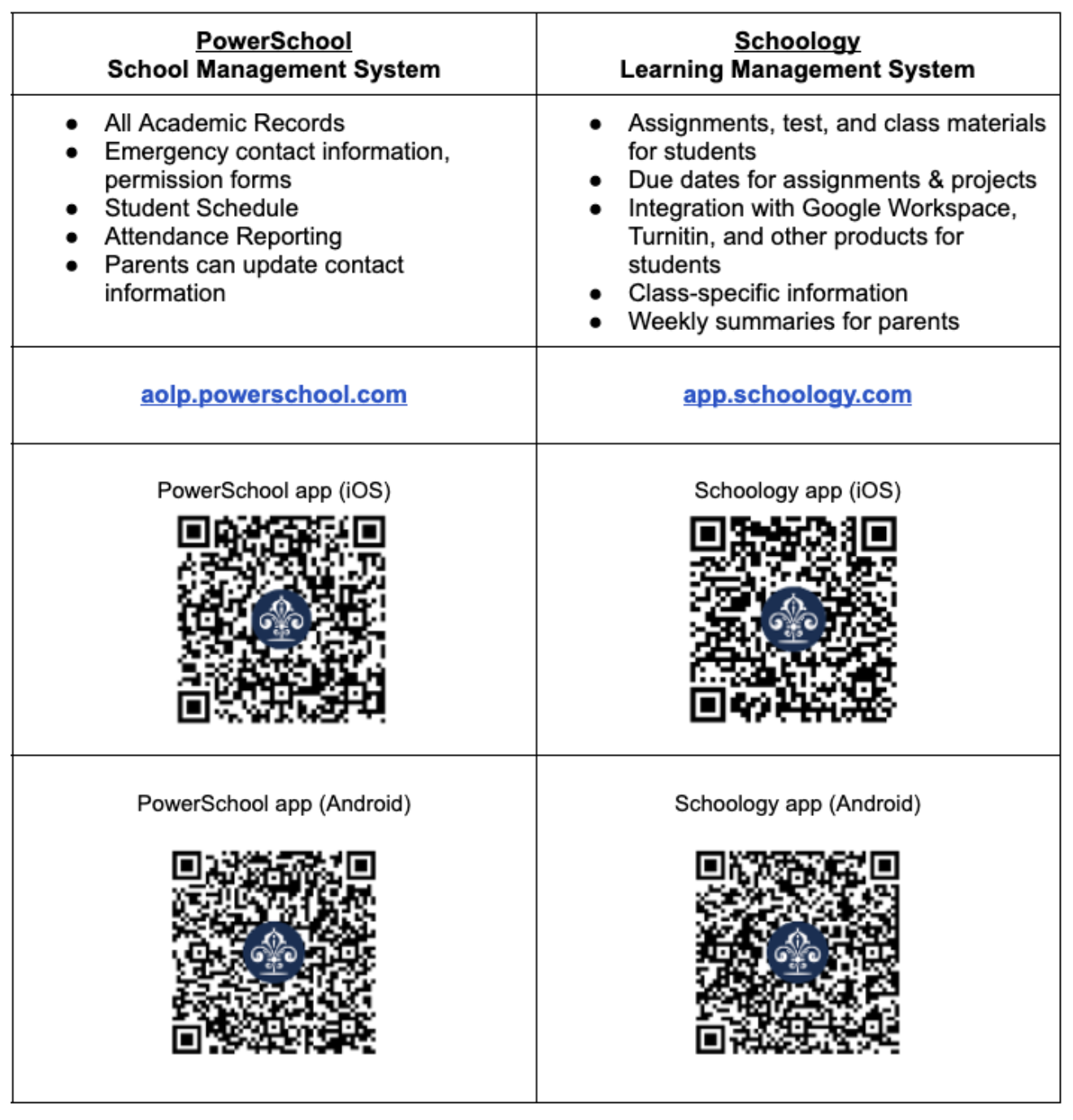
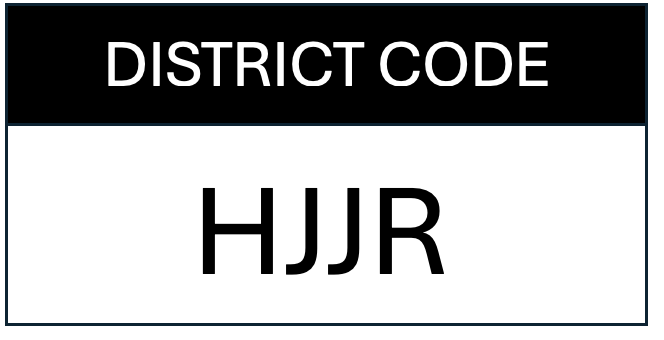
All opening of school forms are now accessible on PowerSchool. It is recommended that all parents download the PowerSchool app for easier navigation of forms! It is much easier on the App and easily allows you to complete the same forms for all siblings. Once you download the App, you will be asked for the OLP District Code: HJJR.
Be sure to login using a desktop browser before attempting to login via either app.
All OLP student course schedules for the 2026–2027 academic year will be available through the OLP PowerSchool website or app starting June 1. To view class registrations, navigate to Class Registrations 26-27 in the Left Side Menu. Final schedules with teachers and room locations will be released after the conclusion of Summer School on Monday, July 27.
To view a student's ID, go to Student Profile, also found in the Left Side Menu.
Please note that schedule changes will only be made for the following reasons:
- There is a missing course (or a "hole") in a student's schedule;
- If the student is missing a course necessary for the student to meet graduation requirements;
- For example, the student does not have a scheduled theology course each semester; the student is missing a year-long English course; or the student did not schedule a necessary Math/Science course.
- The student completed a course over the summer that now shifts them into a new course of study for the 2026-2027 school year.
- For example, the student successfully completed Spanish II, moving them into Spanish III; or the student completed a Pre-Requisite such as Honors Algebra II, for an advanced Math Course
Please note that schedules are made in April based on student and parent requests. Teacher's contracts for the academic year are then developed based on these requests, and the corresponding master schedule is built. Therefore, the school is unable to accommodate schedule changes at this time due to the following reasons without new or compelling information that was not available at the time :
- The student no longer wishes to take a course (choice, interest, has a change of heart).
- The student has decided to take opt out of a course into a study hall.
- The student would like to switch to a different course.
- For example, a schedule change will not be made at this time to move a student from one elective to another.
- The student would like to change teachers.
- The student would like to switch levels (AP/Honors to Regular, or vice versa) - this would only be considered with new and compelling information
For specific information on your daughter's schedule, please reach out to their assigned counselor. Counselors will be available for appointments and returning emails starting the first week of August 2026.
ASSISTANT PRINCIPALS BY STUDENT LAST NAME:
A-F: Mrs. Flannery
G-M: Mrs. Rajski
N-Z: Mrs. Meza
Counseling Department Webpage
Students can use their course schedule and the textbook list to order their 2026-2027 textbooks. For your convenience, starting June 1, 2026, OLP has partnered with Follett Virtual Bookstores as our official source for textbooks! Using the booklist provided by faculty, Follett stocks course materials in a variety of formats and seeks cost-effective solutions, such as rentals and used books, whenever possible. Another advantage to this partnership is that Follett will buy books back at the end of the year if they can be used again. Questions about the textbook buying process? Please email Mrs. Siobhan MacManus, Head Librarian.
Uniforms can be purchased from WearColors Uniforms online. Items ship from a Los Angeles distribution center within 2-5 business days.
Pilots, don't let summer assignments sneak up on you! Complete all coursework before the first day of classes and hit the ground running. Access everything through the OLP Summer Assignments 2026 Google Site below.
Student Class Meetings, Picture Day, and Frosh Orientation Day 2 on Monday, August 10, 2026
Frosh Class of 2030:
- Frosh Photos: 8:30 am - 9:30 am
- Class Meeting: 9:30 am - 10:30 am
- Orientation: 10:30 am - 1:30 pm (Lunch provided at 12:15 pm)
Sophomore Class of 2029:
- Sophomore Photos: 9:30 am - 10:30 am
- Class Meeting: 10:30 am - 11:30 am
Junior Class of 2028:
- Junior Photos: 10:30 am -11:30 am
- Class Meeting: 11:30 am - 12:30 pm
Senior Class of 2027:
- Senior Photos: 11:30 am - 12:30 pm
- Class Meeting: 12:30 pm - 1:30 pm
Students should wear their formal uniform for their class meetings and pictures. Order forms to purchase pictures will become available in July.
Seniors and your parents, will be given a special Class of 2027 webpage. One of the early deadlines will be the January 2027 Yearbook Senior Ad, due on Friday, January 22, 2027.
- September 19, 2026: Senior Family Brunch/Bali Hai 9:00-11:00
- TBD Senior Sunrise
- October 6 - 8, 2026: Kairos Overnight Retreat II (Optional)
- January 5 - 8, 2027: Retreat Week Senior Sisterhood Day and Intersession Courses (Required - No overnight options.)
- February 16, 2027: 100 Days to Graduation Celebration
- April 6 - 8, 2027: Kairos Overnight Retreat III (Optional)
- April 23, 2027: Senior Mass with SAHS
- April 27, 2027 Special senior celebration during Lunch(Formal Uniform)
- April 30, 2027 Powder Puff game at Seniors vs. Juniors at Saints
- May 1, 2027: OLP and Saints Senior Prom
- May (Date TBD) Grad Nite
- May 17, 2027: Senior Chalk Day
- May 18, 2027: Academic Assembly (Parents Welcome) at 1:30 pm & Evening of Excellence Ceremony at 6:00 pm
- May 21, 2027: Senior Farewell Assembly at 11:30 am.
- May 26, 2027: Baccalaureate Mass Class of 2027 at 6:00 pm
- May 27, 2027: Graduation Ceremony Class of 2027 at 4:00 pm
Mandatory Graduation Rehearsal
Graduation rehearsal will take place at 12:30 pm on Monday, May 24, and is mandatory. Please plan accordingly. You must be present even if you do not have an exam. No one will be excused. Tickets will not be released if you are not in attendance. Please report to North Terrace at 12:30 pm. Dismissal time depends on your cooperation in being ready to begin rehearsals promptly. Do not plan on being dismissed before 3:30 pm.
Back to School Night: Thursday, August 13, 2026
We are so excited to host you for Back-to-School Night either in person or virtual, and have the opportunity to connect with your daughter's teachers, fellow parents, and school personnel. Below is a schedule and necessary information for the evening.
Relationships are fundamental to the partnerships we develop as a school and parent in the education of your daughters. All OLP parents and guardians are invited to Back-to-School Night on Thursday, August 13 at 6:00 pm. We will begin the night with parent grade-level class meetings from 6:00 pm - 6:20 pm. Locations are listed below.
- Frosh Class of 2030 will have the chance to mix and mingle with Pilot Parents on St. Joseph Upper Plaza
- Soph Class of 2029 will meet in the St. Thérèse Library and Performing Arts Complex, Tubao Library (2nd Floor)
- Junior Class of 2028 will meet in the St. Thérèse Library and Performing Arts Complex, Theater (Lower Level)
- Senior Class of 2027 will meet in Campus Ministry
Due to spacing, we would ask that two parents/guardians per student are welcome to join us in-person; additional attendees may join via Zoom.
Light grab and go refreshments/snacks will be provided outside on St. Joseph Plaza starting at 5:30 pm. The first bell to move to Block A will ring at 6:20 pm.
If you have any questions, please reach out to our Assistant Principal of Curriculum and Instruction Jen Meza at [email protected].
Prior to Back-to-School Night, parents should consult with their daughter about their class schedule. Students will be provided a class schedule guide for their parents. A copy of the class schedule is also accessible on PowerSchool. As partners in education, parents are encouraged to attend Back-to-School Night in order to meet teachers and receive pertinent course information. It is not, however, necessary to inform the school if you are unable to attend.
Schedule
- 5:30 - 6:00 pm: Grab and Go Refreshments available on St. Joseph Plaza
- 6:00 - 6:20 pm: Parent Grade Level Class Meetings
- 6:30 - 6:40 pm (in Block A classroom): Prayer & Welcome Address from Dr. Lek and Mr. Harris
- 6:40 - 6:50 pm: Block A
- 6:55 - 7:05 pm: Block B
- 7:10 - 7:20 pm: Block C
- 7:25 - 7:35 pm: Block D
- 7:40 - 7:50 pm: Block E
- 7:55 - 8:05 pm: Block F
- 8:10 - 8:20 pm: Block G
- 8:20 - 8:30 pm: Zero Block (Mr. Moreno’s Video Production Class) & Global Scholars Program (Hanley)
For those attending Back-to-School Night via Zoom, an email will be sent the morning of Back to School Night.
Parents will be following their daughter’s academic schedule to meet her teachers. Each academic block will be 10 minutes in length, with a 5 minute break in between.
OLP strives to develop mastery of 21st-century skills in each student in order that she becomes an engaged agent of change in our global society. Technology plays a critical role in the way we collaborate and communicate in that same world. OLP requires that all students have access to the tools of the 21st-century via a mobile device. With respect to OLP’s mission and the economic diversity of our families, OLP does not mandate the specific device each student uses, but rather, has adopted a “Bring Your Own Device” (BYOD) policy that outlines minimum specifications for whatever device a family chooses.
This policy and practice guide the use of interactive instruction and learning that connects our students more meaningfully to the world outside, and, just as effectively, the world outside to the classroom.
BYOD Minimum Requirements
- Laptop Specifications: (Mac/Windows/ChromeBook)
- Wi-Fi: 802.11 g/n/x/ax
- Battery Life: 6+ hours recommended (4 hours min.)
- System Age: Younger than four years
Please note: iPads are not supported due to software compatibility issues.
For reference, below is the percentage of the student body that uses the following types of devices (2025-2026 school year):
- Apple MacBook (MacOS) = 85%
- PC (Windows OS) = 8%
- Chromebook = 7%
Download the OLP PowerSchool APP
The OLP PowerSchool APP allows parents to easily track students' grades, submit required forms, and check attendance.
NOTE: Login to PowerSchool from a browser first (desktop or laptop), before attempting to login via the app. First login typically requires you to choose a new password, which can cause issues in the app.
STEP 1. Download the Mobile App


STEP 2. Enter the District Code
STEP 3. Watch one of the PowerSchool Videos to learn how to easily navigate the app.
STEP 4. Complete the OLP Opening of School Forms.
If you are struggling with accessing the PowerSchool APP, you can always access the online Web-based browser. Also, you can reach out to one of our team members in IT at [email protected].
Be sure to complete the required forms. These are due within the first week of school and a requirement to participate in any co-curricular activities. All parents and students are also required to read and sign the annual acknowledgment of reading the OLP Student-Parent Handbook.
Download the OLP Schoology APP
If you are struggling to download the APP, you can always access Schoology from any browser below:
NOTE: Login to Schoology from a browser first (desktop or laptop), before attempting to login via the app. First login typically requires you to choose a new password, which can cause issues in the app.
The OLP Schoology APP allows parents to easily track comments from teachers, students' assignments, and check on missing assignments.
STEP 1. Download the Mobile App
STEP 2. Enter Academy of Our Lady of Peace, and enter the username (email) and password assigned by the school. If you do not have these, enter forgot password!
- Make sure you are connected to your Students in Schoology!
STEP 3. Watch one of the Schoology Videos to learn how to navigate the app.
Schoology Mobile App for Parents
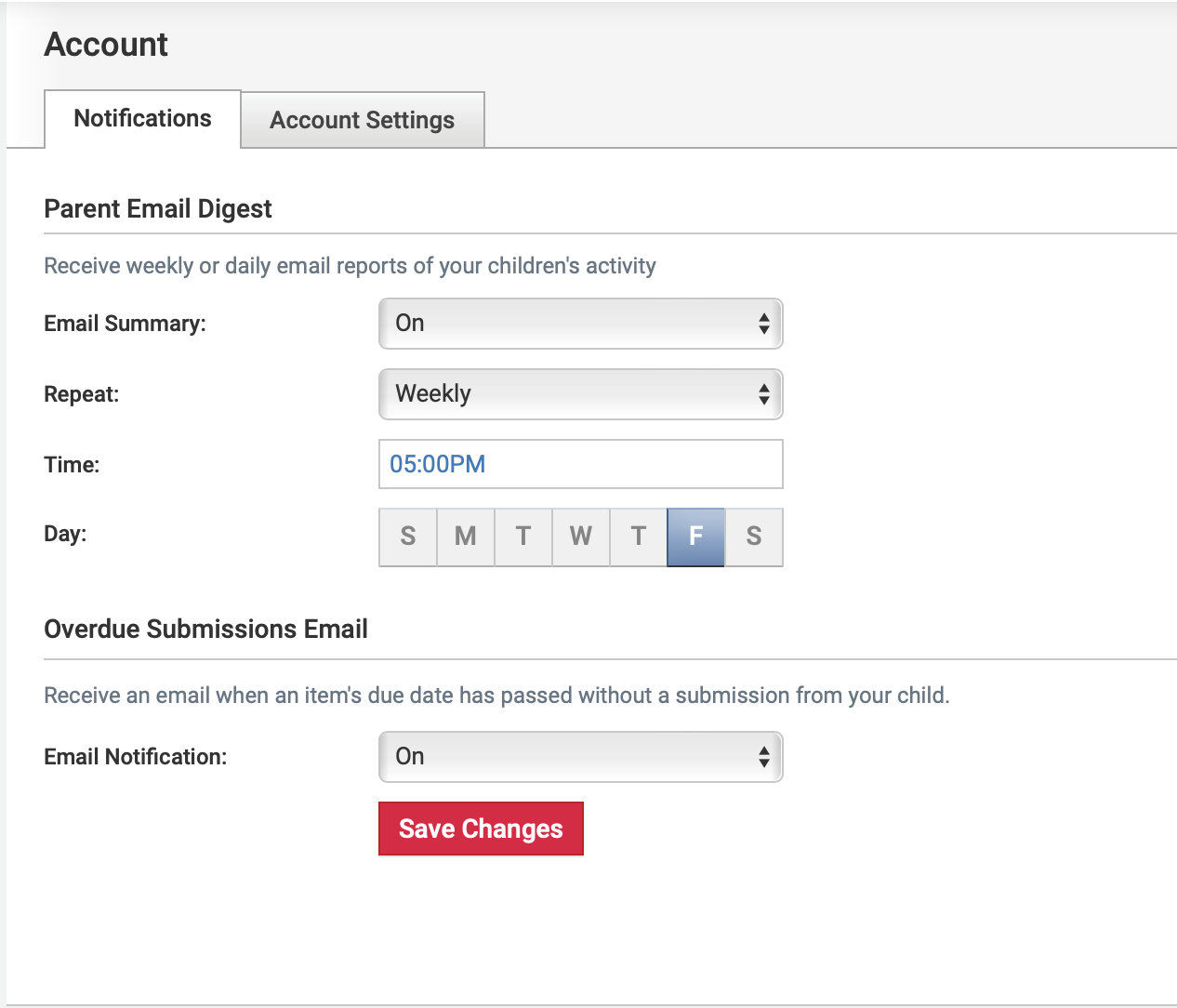
STEP 4. Be sure to sign-up for parent notifications!
- In the top right hand corner, click on your student's Profile Picture (It should be their name)
- Scroll down to Settings....top left Account
- Click on Notifications. You can choose how you would like your parent notifications set-up. For our family, this is your pass for the weekend! I like mine to come in right before the teen decides to go out on Friday night. If the email shows me no missing assignments, then they get to go. Otherwise, negotiations begin! Choose what works best for your family. For us, once weekly is good. For you, it might be daily. Think of it like the stock market... if you check too often, it might cause unnecessary stress. Too infrequently, and you might not be able to recover fast enough!
Finally, if you get stuck, reach out to [email protected]. One of our IT team members will be sure to help!